

Our Verdict
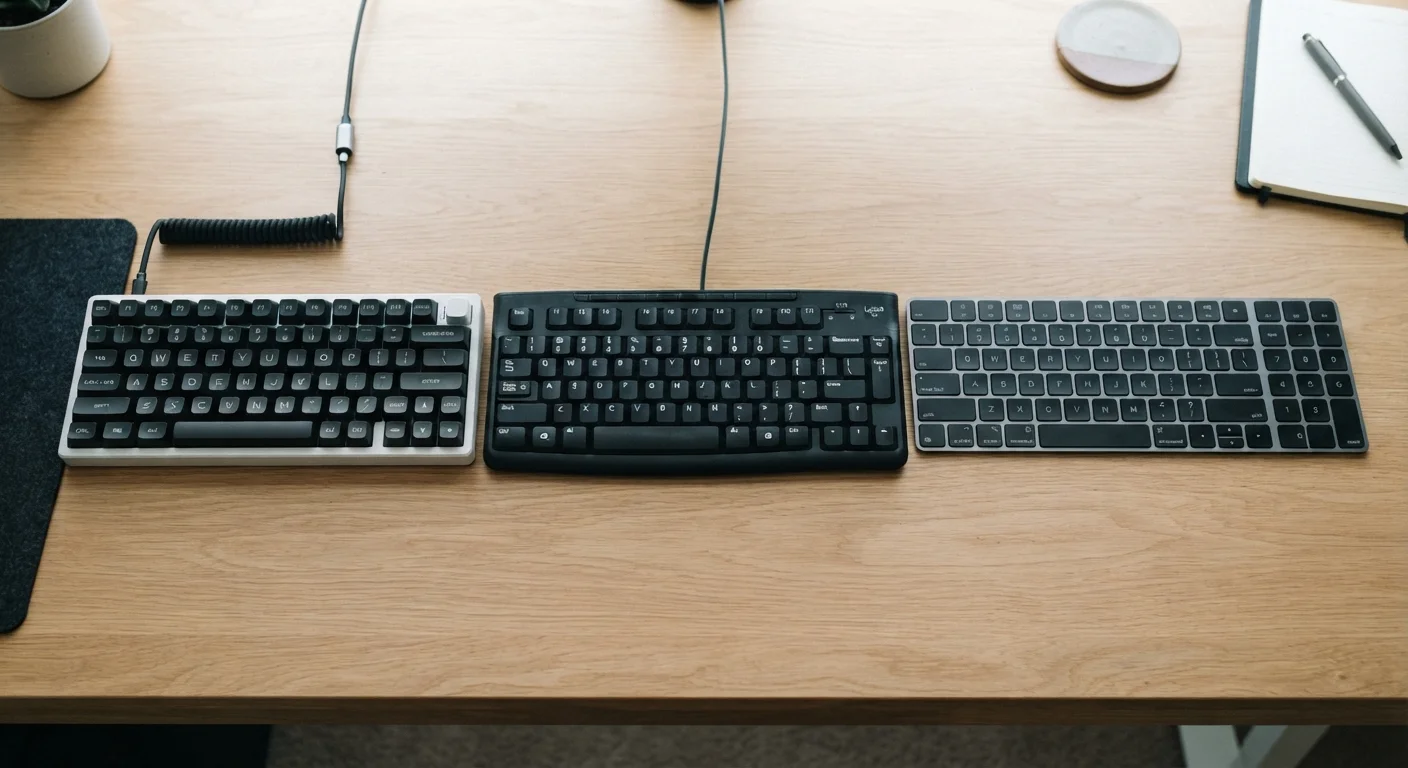
Mechanical keyboards excel for users who type heavily and value feedback and longevity. Membrane keyboards work well for budget-conscious, quiet office environments. Scissor-switch keyboards are the natural fit for laptop users and those who prefer a low-profile form factor. Understanding what each design actually does helps you choose with confidence rather than guesswork.
| Best for | Recommended |
|---|---|
| Writers, coders, and power typists who type for hours daily | Mechanical |
| Shared or open office environments where noise is a concern | Membrane |
| Laptop users or those who prefer a slim, low-travel keyboard | Scissor-Switch |
| Budget-focused users who need a functional everyday keyboard | Membrane |
Why Keyboard Type Actually Matters
Most people use a keyboard every day without giving much thought to what's happening beneath each keycap. But the mechanism inside a keyboard - the technology that registers each keystroke - has a direct effect on how typing feels, how loud it is, how accurate it is, and how long the keyboard lasts.
There are three main keyboard technologies in widespread use today: mechanical, membrane, and scissor-switch. Each takes a different engineering approach to detecting key presses, and each comes with a distinct set of trade-offs. If you've ever wondered why one keyboard feels crisp and clicky while another feels soft and muted, the answer lies in these underlying designs.
This is part of a broader world of computer accessories covered in our guide to computer peripherals, but keyboards deserve their own breakdown given how much they shape the daily computing experience.
Mechanical Keyboards: Individual Switches, Maximum Feedback
Mechanical keyboards use a dedicated physical switch beneath each keycap. When you press a key, a spring-loaded mechanism actuates and registers the keystroke at a specific point in the key travel - often before the key fully bottoms out. This is called the actuation point.
Mechanical switches come in several varieties, broadly categorized as:
- Clicky - produce an audible click and tactile bump (popular with typists who want clear feedback)
- Tactile - offer a physical bump without the loud click
- Linear - smooth, consistent keystrokes with no bump or click (preferred by many gamers)
The primary advantages of mechanical keyboards are durability and precision. Individual switches are typically rated for 50 to 100 million keystrokes, making them significantly longer-lived than membrane alternatives. The trade-offs are cost - mechanical keyboards generally run higher than comparable membrane models - and noise, particularly with clicky switches.
Try Before You Commit
If possible, test a mechanical keyboard in a store or borrow one from a friend before purchasing. Switch type makes a substantial difference in typing feel, and what reads well on a spec sheet can feel very different in practice. Many keyboard enthusiasts find their preference only becomes clear after hands-on experience with different switch varieties.
Membrane Keyboards: Quiet and Affordable
Membrane keyboards work through a completely different mechanism. Instead of individual switches, they use three layered sheets of flexible material. When you press a key, the top layer flexes down to make contact with the bottom layer through a hole in the middle layer, completing an electrical circuit and registering the keystroke.
This design has clear advantages: membrane keyboards are generally quieter, lighter, and less expensive to manufacture. They're the most common keyboard type found in offices and bundled with desktop computers. Spill resistance is also somewhat better, since there are fewer gaps for liquid to penetrate.
The limitations are in feel and longevity. Because the entire surface is one connected sheet, membrane keyboards can feel "mushy" - there's less precise tactile feedback to confirm when a keystroke has registered. Over time, the membrane material can wear unevenly, and the keyboards typically have shorter rated lifespans than their mechanical counterparts.
| Mechanical | Membrane | Scissor-Switch | |
|---|---|---|---|
| Tactile Feedback | Strong, precise | Soft, minimal | Moderate, stable |
| Noise Level | High (clicky) to moderate | Low | Low to moderate |
| Key Travel Distance | 3-4 mm | 3-4 mm | 1-2 mm |
| Typical Durability | 50-100M keystrokes | 5-10M keystrokes | 10-20M keystrokes |
| Profile / Thickness | Thick | Medium | Slim |
| Common Use Cases | Typing, gaming | Office, everyday use | Laptops, compact setups |
Scissor-Switch Keyboards: The Laptop Standard
Scissor-switch keyboards are technically a refined form of membrane keyboard, but the mechanism is distinct enough to warrant separate consideration. Each keycap is supported by a small plastic stabilizer shaped like two interlocking brackets - resembling scissors - that keep the key level and reduce wobble as you type.
This design allows for much shorter key travel (the distance a key moves when pressed) compared to either standard membrane or mechanical keyboards. The result is a low-profile keyboard that's stable, consistent, and quiet. Scissor-switch keyboards are standard on most laptops and on slim external keyboards designed to match them.
The feel is often described as firm and precise relative to standard membrane keyboards, but without the pronounced tactile bump of mechanical switches. Key travel on scissor-switch boards typically ranges from 1 to 2 millimeters, compared to 3 to 4 millimeters on mechanical keyboards. For users transitioning between a laptop and an external keyboard, scissor-switch designs usually feel most familiar.
Choosing the right keyboard is one consideration when thinking about your broader computing setup - similar factors of feel, portability, and use case come up in decisions like weighing desktops against laptops.
Choosing the Right Keyboard for Your Situation
The right keyboard depends on three practical questions: Where will you use it? What will you do with it? How much does noise matter?
50-100M
Keystroke lifespan of mechanical switches
Mechanical switch manufacturers commonly rate individual switches at 50 to 100 million actuations, far exceeding typical membrane keyboard ratings.
1-2 mm
Key travel on scissor-switch keyboards
Scissor-switch designs used in most laptops feature significantly shorter key travel than mechanical keyboards, contributing to their slim profile.
Heavy typists - writers, programmers, data entry professionals - often gravitate toward mechanical keyboards for the reliable feedback and long-term durability. The higher upfront cost tends to pay off over years of daily use.
In shared workspaces or open-plan offices, the quieter profile of membrane or scissor-switch keyboards is often a practical necessity. Clicky mechanical switches, while satisfying to the user, can be genuinely disruptive to colleagues nearby.
Laptop users typically don't have a choice - scissor-switch is built in. But when selecting an external keyboard to pair with a laptop or for a home office, understanding these distinctions helps explain why keyboards that look similar on a shelf can feel dramatically different in use.
There's no universally correct answer here. The keyboard that works for a novelist drafting long-form content may be entirely wrong for a graphic designer making short, frequent inputs. Knowing what each technology actually does puts you in a much stronger position to evaluate your options based on what matters to your specific situation.
The content on this site is for informational purposes only and is not a substitute for professional advice. Always consult a qualified professional for guidance specific to your situation.